Why the UGREEN NASync DH2300 Is the Hottest “Skip-Cloud” NAS for Families in 2025

Description
UGREEN’s NASync DH2300 offers a one-time purchase NAS solution (up to 60 TB) with no monthly fees ideal for home media, backups, and private cloud. Discover cost, buying options, hard-drive tips, and Altas’s view.
What is the UGREEN NASync DH2300
- The NASync DH2300 is a 2-bay home NAS (Network Attached Storage) enclosure from UGREEN designed for families, media lovers and anyone who wants to ditch recurring cloud storage fees. (UGREEN NAS US)
- It runs on an ARM-based Rockchip CPU (8-core A72 + A53), comes with 4 GB LPDDR4X memory, supports up to 60 TB of storage (2 × 30 TB drives), offers RAID 0 / RAID 1 / JBOD / basic modes for flexibility, and connects via 1 GbE LAN. (UGREEN NAS US)
- The unit itself is sold diskless, giving buyers freedom to choose their hard drives. (UGREEN NAS US)
Price & Where to Buy
- On UGREEN’s official store and major retailers, the DH2300 is listed around US $167.99–209.99 (depending on sales/discounts). (UGREEN NAS US)
- It’s available on marketplaces like Amazon and UGREEN’s online store. (Amazon)
- For many users, this one-time purchase replaces recurring cloud fees making it a compelling “buy-once, store-forever” solution. (UGREEN NAS US)
Why It’s Popular / What Makes It Stand Out
- No Monthly Fees. Unlike cloud subscriptions that accumulate over time, once you buy the NAS and add drives, you own the storage forever. That appeals to families storing large photo/video libraries, backups, or media libraries. (UGREEN NAS US)
- Large Storage Capacity at Home. With up to 60 TB capacity (and more if drives are swapped later), it’s more than enough for years of multimedia, backups, and document archiving. (UGREEN NAS US)
- User-Friendly & Beginner Friendly. Reviews note that DH2300 is simpler and more accessible than many traditional NAS systems making it suitable for users who don’t want to handle complex server setups. (Cult of Mac)
- Local Privacy & Ownership. Files are stored locally at home, not with third-party cloud providers giving you full control over your data, privacy, and access. (UGREEN NAS EU)
- Versatile Use Media, Backup, Sharing. Great for media streaming, storing family photos/videos, backups of multiple devices, even remote access if configured. (techradar.com)
What to Consider When Choosing Hard Drives for Your NAS
Because DH2300 is diskless, hard drive choice is critical. Here are key factors based on expert guides. (NAS Compares)
- NAS-optimized HDDs over regular desktop drives: NAS HDDs are built for 24/7 operation, better vibration tolerance, more robust firmware crucial for reliability in RAID setups. (blog.synology.com)
- Workload & endurance: NAS drives are rated for continuous use; desktop drives often aren’t, which can lead to earlier failure if used continuously. (Synology)
- Capacity & redundancy: Choose drives that match capacity across bays if you want to use RAID 1 (mirroring) useful for data protection. (Windows Central)
- Drive type avoid SMR for NAS / RAID: For reliability and performance, choose CMR (Conventional Magnetic Recording) drives SMR drives can cause issues under heavy NAS workloads. (Reddit)
Bottom line: Don’t skimp on drives your data’s safety depends on using NAS-rated, reliable HDDs (or SSDs for certain use-cases).
 ltas Opinion Is DH2300 Worth Buying in 2025?
I believe the DH2300 is one of the best “budget-to-mid” home NAS options right now especially for everyday users and families:
- ✅ Smart value play: Its price vs storage capacity and lifetime cost (versus cloud subscriptions) makes it a smart investment pay once, own forever.
- ✅ Data ownership & privacy: As cloud services get expensive and come with privacy trade-offs, home NAS brings control back to the user.
- ✅ Simplicity wins for many: Not everyone needs heavy server features; for basic backup, media streaming, and file sharing DH2300 does enough.
⚠️ But with caveats: If you expect heavy workloads (like virtualization, many users simultaneously, heavy media transcoding, advanced server tasks), DH2300’s modest ARM CPU, single 1 GbE port, and limited expansion may feel restrictive. In that case, a higher-end NAS (or more advanced UGREEN models) is better.
Conclusion (Altas): For most home users especially users moving away from cloud storage DH2300 offers solid, hassle-free, and private long-term storage. But always pick good NAS drives and plan storage + redundancy wisely.
FAQs What People Rarely Ask But Should Know
Q1: Can I use any hard drives with the DH2300, or must they be NAS-specific?
A: Technically yes, you can use any 3.5″ SATA drives. But for longevity and reliability, NAS-specific drives are strongly recommended they are designed for 24/7 operation and RAID environments. (Synology)
Q2: What happens if one drive fails do I lose all my data?
A: If you configure drives in RAID 1 (mirroring), one failed drive means your data remains intact on the other. Without RAID, failure on one drive results in data loss so redundancy is important.
Q3: Will DH2300 automatically replace cloud backups (Google Drive, iCloud, etc.)?
A: Yes for most users, it can fully replace cloud storage for photos, videos, backups, and files, with the benefit of no recurring fees provided they add sufficient drives and optionally backup externally.
Q4: Is DH2300 suitable for multiple users or family sharing?
A: Absolutely. NAS by design allows multiple devices/users on the same local network to access files simultaneously great for family media libraries, shared backups, and collaborative file storage. (Wikipedia)
Q5: Unique FAQ – What if I want more than 60 TB storage later?
A: You can swap out drives for larger ones later, or migrate data to a larger NAS enclosure. Many NAS drives and systems are modular and scalable over time.
Q6: Unique FAQ – How does power usage and noise compare to cloud + external drives?
A: A NAS system consumes some electricity and generates some noise, but modern units like DH2300 are optimized for efficiency and quiet operation often still more convenient and accessible than constantly connecting external drives or relying on slow cloud syncs. (techradar.com)
Final Thoughts
The shift from subscription-based cloud storage back to personal NAS is gaining traction and for good reason. With the UGREEN NASync DH2300, many users get a cost-effective, privacy-safe, and user-friendly alternative.
If you want a simple “set and forget” private cloud at home for photos, documents, backups, media DH2300 is a very attractive choice. Just make sure to complement it with proper NAS HDDs for reliability.
From my view: DH2300 is ideal for most home users. For heavy workloads or enterprise-level features, look for more advanced NAS but for private cloud and family storage, this is one of the smartest buys of 2025.
Table of Contents
- Resident Evil Requiem Becomes 2026’s Highest-Rated Game – A Survival Horror Masterpiece or an Overhyped Sequel That Loses Steam?
- Black Ops 7 Sets a New Standard for Tactical FPS Combat – But Controversy and Matchmaking Frustrations Spark Debate
- Ghostrunner 2 Free on Epic Games, A Cyberpunk Masterpiece of Relentless Action – or a Brutally Punishing Game That’s Too Hard to Love?
- Code Vein II Is a Beautiful Evolution – But Its Uneven World Holds It Back! Or Does It Still Lack the Crown? (Feb 2026)
- Nioh 3 Review- A Brutal Soulslike Masterpiece That Perfects Samurai Combat – Or an Unforgiving Grind That Pushes Players Too Far?

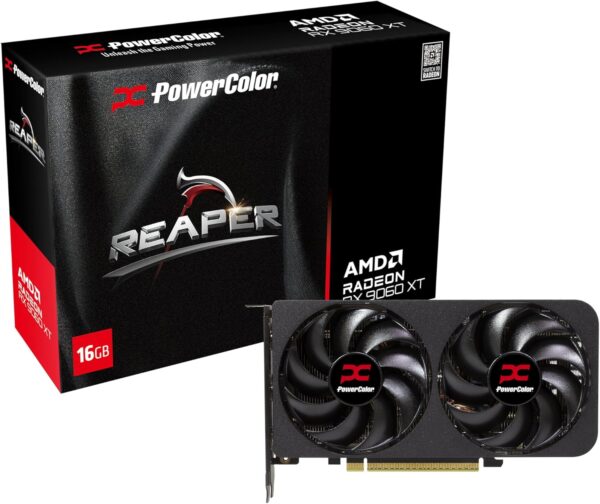
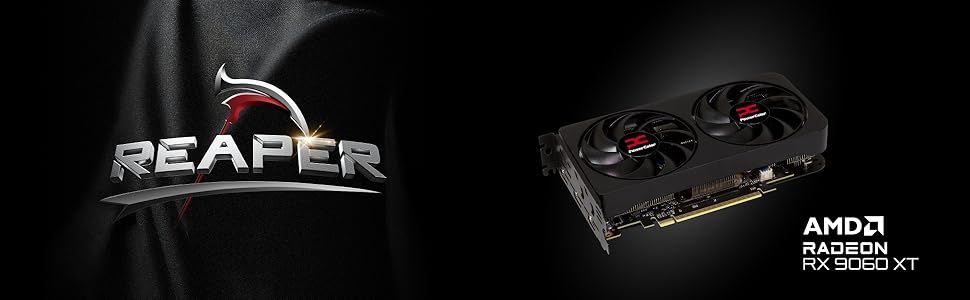
PowerColor Reaper AMD Radeon RX 9060 XT 16GB GDDR6
From the manufacturer

High-Thermal Conductivity Honeywell PTM7950
The phase-change properties of PTM7950 ensure that micro gaps between the GPU and heatsink are rapidly filled during high-load operations, significantly enhancing thermal efficiency.
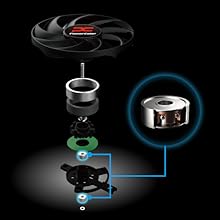
High Quality Japanese Dual Ball Bearings
Dual ball bearings reduce rotational friction, providing excellent heat dissipation and effectively doubling the expected lifetime of the fans.

Intelligent Fan Controller
Utilizing temperature detection from a smart chip, fans will start running when the GPU reaches 60℃ and shut down below 50℃. Efficient cooling, fan-noise reduction, and extended product lifetime are all benefits of a more accurate temperature monitoring.
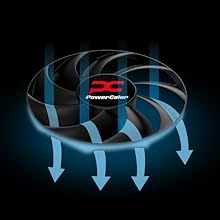
High-Efficiency Ring Blade Fans
Designed for passionate gamers, delivering the coolest experience.
Exclusive ring blade design with up to 9 blades improves fan speed while maintaining low noise levels. It enhances air pressure and airflow, achieving optimal cooling performance.
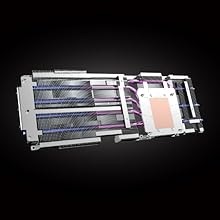
Copper Base Direct Touch
A smooth copper base directly contacts the GPU to enhance exceptional heat transfer, and improves heat dissipation from the VRAMs to keep the card in the optimum cooling condition.

Leave a Reply